When a BAT BMS APK makes sense
A BAT BMS APK is mainly relevant when a user has an Android device without Google Play, a region where the listing is not available, or a repair/test phone that needs a direct install workflow. It is not automatically better than the Play Store route. Because BAT BMS communicates with compatible battery management hardware over Bluetooth, the app may receive sensitive device state such as pack voltage, cell data, temperature, current, and protection status. That makes source verification more important than speed.
The homepage already covers the broad BAT BMS download intent for Android and iOS. This APK page exists for the narrower Android sideload decision: how to compare package name, version, file size, update date, and visible app identity before installing anything. If Google Play works on your phone, use it first because it gives the cleanest update and uninstall path.
- Use APK sideloading only when a store install is unavailable or impractical.
- Keep a note of the source URL, version number, package name, file size, and date you checked.
- Avoid pages that force unrelated installers, notification prompts, browser extensions, or unclear download buttons.
Version and source facts checked August 12, 2026
Google Play remains the official Android reference for package com.bms.grenergy and developer SHENZHEN GRENERGY TECHNOLOGY CO.LTD. The August 12, 2026 check did not return a stable Android version number or a direct APK file URL, so this guide does not call a third-party file the latest.
Apple’s public Lookup API returned BAT-BMS version 1.1.5, a 9.1 MB download, iOS 12.0 or later, and an August 3, 2026 release date when checked on August 12, 2026. Confirm the store listing again before installing because regional availability and version data can change.
| Field | Current checked value | How to use it |
|---|---|---|
| Package | com.bms.grenergy | Reject files with a different package name unless the developer documents a migration. |
| Android version | Check Google Play for this device | Use the official store value; do not treat a mirror number as definitive. |
| Android update date | July 11, 2026 on Google Play | Recheck the official listing before installing because store data can change. |
| iOS version | 1.1.5 from Apple Lookup API | Confirms the official iOS app family; it is not an Android APK source. |
| Developer / seller | SHENZHEN GRENERGY TECHNOLOGY CO.LTD. / Shenzhen Grenergy Technology Co.,Ltd. | Use the identity as a source-verification check. |
Safer BAT BMS APK install checklist
Before installing a BAT BMS APK, slow down and compare details. Many APK pages are legitimate mirrors or version archives, but search results can also mix unrelated apps, mod pages, scraped listings, and download buttons that are not the file you expect. A battery monitoring app is not a game you can casually test and delete later; it may guide decisions about charging, discharging, troubleshooting, and battery pack handling.
If you decide to sideload, download only one file, scan it with the protection tools already available to you, install from the Android system package installer, and disable the browser or file manager's install-unknown-apps permission after the install. When the app opens, grant only permissions needed for Bluetooth discovery and setup. If the APK asks for unrelated permissions, shows a different app name, or cannot explain why it differs from com.bms.grenergy, stop.
- Compare package name, version, file size, update date, developer name, icon, and screenshots.
- Prefer version-history pages over random direct-download buttons when you only need version facts.
- After installation, open Android app info and confirm the package, permissions, and storage usage look reasonable.
- Do not connect the app to battery hardware if the source or app identity looks suspicious.
After installing: connection and safety notes
Once BAT BMS is installed, the first successful launch is only the beginning. Make sure Bluetooth is enabled, stand near the compatible BMS module, and allow the nearby-device or Bluetooth permission that Android requires for discovery. If the app cannot find hardware, restart Bluetooth, move closer, power-cycle the module only if the battery hardware instructions allow it, and close any other phone that may already be connected.
Treat app readings as monitoring data, not as a full safety diagnosis. If cell voltage, temperature, charge state, or protection messages look unusual, pause charging or loading the battery until you can verify the system with proper tools or the hardware maker's guidance. An APK install guide should never imply that installing the app can repair a damaged battery, reset an unsafe pack, or make a questionable file safe.
How to choose a BAT BMS APK download source
For the bat bms apk download intent, start with the official Google Play listing for package com.bms.grenergy. The fresh Android check for this update did not return a stable version number or direct APK file URL, so this page uses Google Play as the official fallback instead of claiming a latest APK.
If Google Play is unavailable, treat an archive as a comparison source only. Check the package name, developer identity, permissions, update date, and checksum when the publisher provides one. A third-party version-history page is not proof that an APK is current or official.
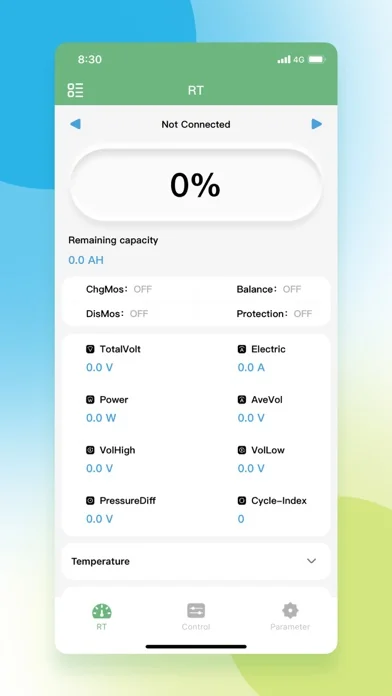
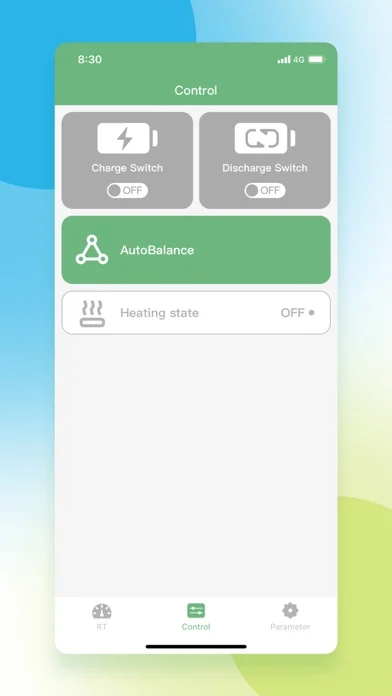
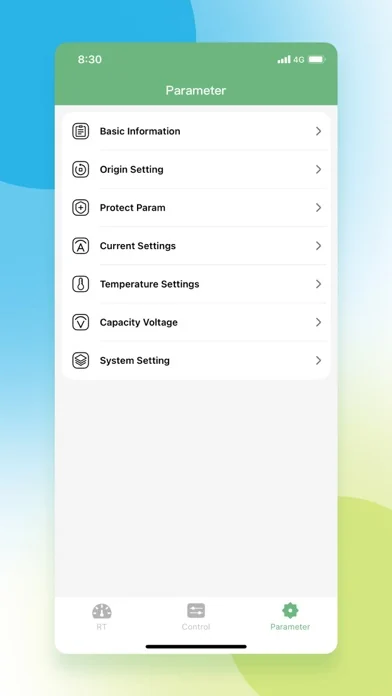
BAT BMS is a Bluetooth battery-management app, not a generic battery booster. After installation, connect only to the intended pack and use the BAT BMS app manual for RT readings, controls, and parameter safety.
- Official Android fallback: the Google Play listing for com.bms.grenergy.
- No stable direct APK URL or verified Android latest-version number was published in this check.
- For iPhone, use the Apple App Store; APK files do not install on iOS.
BAT BMS APK FAQ
Is BAT BMS APK official?
The official Android route is the Google Play listing for package com.bms.grenergy. Third-party APK pages can be useful for version comparison, but this site does not label third-party APK files as official unless the developer or store source supports that claim.
Which BAT BMS APK version should I install?
Use the Google Play version offered to your Android device whenever possible. This site does not publish or endorse an APK version number as “latest” unless the official store exposes it consistently. If you compare a third-party archive, verify package com.bms.grenergy, the developer identity, permissions, and update date before deciding.
Can I install BAT BMS APK on iPhone?
Apple’s official Lookup API showed BAT-BMS version 1.1.5, a 9.1 MB download, iOS 12.0 or later, and an August 3, 2026 release date when checked on August 12, 2026. Confirm the App Store listing before installing because regional listings can change.
Why does BAT BMS need Bluetooth permission?
BAT BMS communicates with compatible battery management hardware over Bluetooth. Android may request nearby-device or location-related Bluetooth permissions so the app can discover the device.
Should I use a modded BAT BMS APK?
No. A modified or cracked battery monitoring app creates unnecessary trust and safety risks. Use Google Play when possible and avoid files that change the app identity, package name, permissions, or download path.
Is there a verified direct BAT BMS APK file URL?
No stable direct APK file URL was verified in this update. Use the official Google Play listing for com.bms.grenergy when possible; do not treat a third-party archive or a guessed CDN path as an official download.
Version and source notes
- Google Play BAT BMS listing - Official Android store listing used for package and developer identity.
- Apple App Store BAT-BMS listing - Official iOS listing verified through Apple’s public Lookup API on August 12, 2026: version 1.1.5, 9.1 MB, iOS 12.0+, released August 3, 2026.
- APKPure BAT BMS version history - Third-party Android version-history page retained only for comparison; it is not treated as the official or definitive latest-version source.