What happened in the July 2026 e-rickshaw reports
Indian news coverage on July 14, 2026 reported complaints that some battery-powered three-wheelers were remotely disabled through a battery-management application. The reports connected the disruption to BAT BMS and highlighted a wider problem: owners and drivers may depend on Bluetooth-connected battery controllers without understanding who can access the controls or how credentials are managed.
The reports are evidence of a security and ownership concern, not proof that every BAT BMS installation is compromised. BAT BMS supports different battery packs and BMS firmware. The available controls, password behavior, radio range, pairing rules, and recovery steps can vary by hardware vendor. Treat claims about one fleet or supplier as a reason to audit your own setup, not as a universal diagnosis.
- Record the battery supplier, BMS model, serial number, app package, and installation date.
- Ask who created or retained administrator credentials.
- Confirm whether the seller can remotely manage the pack after delivery.
How a BAT BMS app can affect charge or discharge
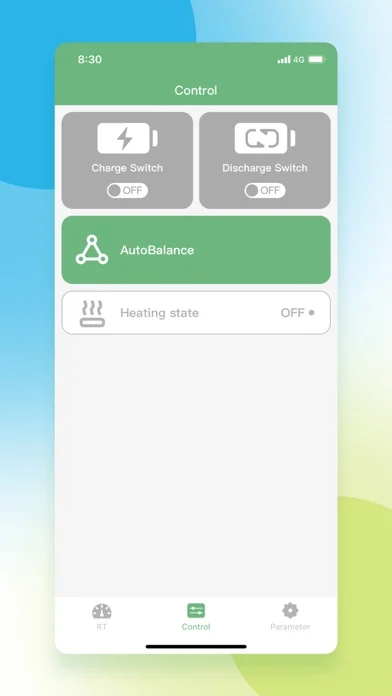
The phone app is an interface to the physical BMS. On compatible firmware, the Control screen can expose Charge Switch, Discharge Switch, AutoBalance, or heating state. Turning a discharge path off can make a vehicle appear to have a dead battery even when stored energy remains. A protection event can create a similar result without any remote action.
Never assume that an OFF status proves hacking. The BMS may have opened a MOSFET because of under-voltage, over-current, temperature, cell imbalance, a loose connection, or another configured limit. Compare the Control screen with the RT protection state, cell voltages, temperature, and an independent meter before changing anything.
- Charge Switch affects the charging path on supported hardware.
- Discharge Switch affects output to the vehicle or load.
- Protection logic may override a user command.
- Firmware and wiring determine the actual behavior.
What data and settings may be visible over Bluetooth
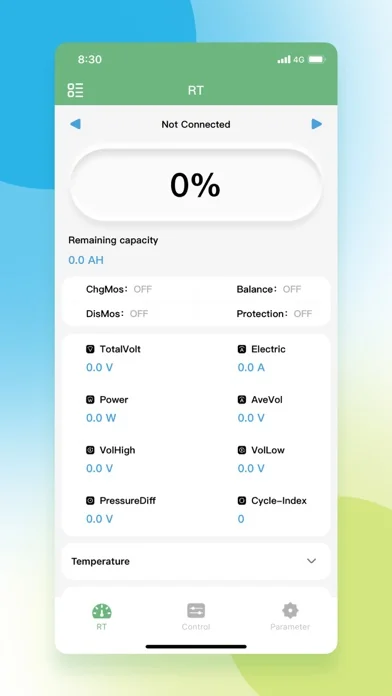
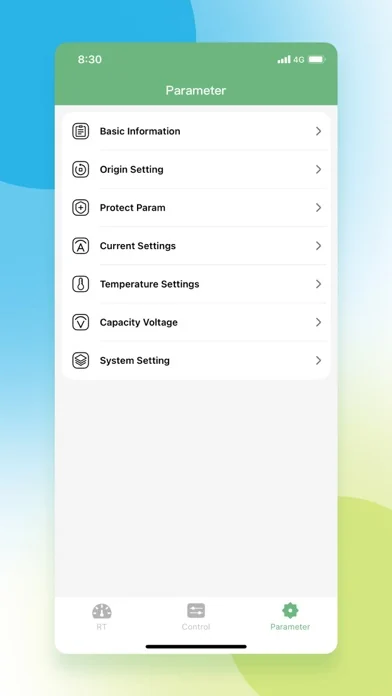
The RT screen may show total voltage, individual cell values, current, power, temperature, remaining capacity, balancing state, and protection flags. The Parameter area may expose battery capacity, voltage thresholds, current limits, temperature limits, system settings, and other hardware-specific values. This information is useful for maintenance, but unauthorized changes can affect reliability or safety.
Google Play identifies the Android package as com.bms.grenergy and lists SHENZHEN GRENERGY TECHNOLOGY CO.LTD. as the developer. On August 4, 2026 the official listing showed an update date of July 11, 2026. Apple’s official listing showed BAT-BMS 1.1.5, 9.1 MB, iOS 12.0 or later, released August 3, 2026. Store identity verifies the app source; it does not verify the security configuration of a specific battery.
- Use the official store package rather than a renamed APK.
- Remove old phones and service devices from access when ownership changes.
- Keep original settings and service records offline.
- Do not share screenshots containing identifiers or credentials.
Owner security checklist for an e-rickshaw or e-bike battery
Use this checklist after buying a vehicle, replacing a battery, changing a BMS, or allowing a repair shop to connect a phone. The objective is to establish ownership and a recoverable configuration without guessing at hidden settings.
| Check | Safer action | Why it matters |
|---|---|---|
| App source | Install from Google Play or the App Store and confirm the package/developer | Reduces the risk of a modified or unrelated app |
| Credentials | Request an owner-specific credential or documented reset process | Shared credentials can remain known to sellers or technicians |
| Paired devices | Remove phones that no longer need access | Old devices can preserve control after a sale or repair |
| Original settings | Save screenshots and the battery specification | Makes unauthorized or accidental changes easier to identify |
| Physical service | Know the fuse, disconnect, wake, and safe recovery procedure | App access is not a substitute for physical safety controls |
What to do if the vehicle suddenly stops
Move out of traffic if possible, switch the vehicle off, disconnect the charger or load only when the manufacturer procedure says it is safe, and check for heat, swelling, odor, smoke, damaged wiring, or water exposure. Do not keep toggling Charge or Discharge in an attempt to force the pack back online.
Then document the time, location, app connection state, RT values, protection message, cell spread, temperature, and Control status. Compare pack voltage with a suitable meter only if you are trained to do so. Contact the battery supplier or a qualified technician when the pack repeatedly trips, the settings changed unexpectedly, or you cannot verify who controls the credentials.
- Safety first: stop charging or loading a visibly abnormal pack.
- Preserve evidence before changing parameters.
- Use one authorized phone while troubleshooting.
- Escalate repeated shutdowns to the battery or BMS supplier.
Passwords, pairing and remote-control claims
There is no single verified public BAT BMS default password that is safe to recommend for every battery. Passwords may be set by the BMS maker, battery assembler, fleet operator, seller, or firmware. Trying common passwords from videos or forums can lock access, create an audit problem, or expose a vehicle to unauthorized control.
Ask the seller for a documented ownership-transfer and reset process. If the supplier cannot explain who controls the credentials, preserve the current settings and seek help from the battery or BMS manufacturer. Do not bypass protections, publish working credentials, or change voltage and current limits merely to restore movement.
- Prefer unique owner credentials when the hardware supports them.
- Change access after resale, service, or staff changes.
- Keep recovery details offline and separate from public vehicle information.
- Treat unexplained remote access as a supplier and security incident.
BAT BMS e-rickshaw safety FAQ
Can BAT BMS turn off an e-rickshaw battery?
On compatible BMS hardware, the app may expose charge or discharge controls that can interrupt a power path. However, normal protection events, wiring faults, low cell voltage, temperature, or hardware failure can produce the same symptom.
How does the BAT BMS app turn off a rickshaw battery?
The app sends commands to the physical BMS. If the firmware accepts a discharge-off command, the BMS can open its discharge MOSFET and stop output. The exact behavior depends on the battery and controller.
Does an OFF switch prove the battery was hacked?
No. A protection event can turn charge or discharge off automatically. Review protection messages, cell voltages, temperature, wiring, and service history before making a security conclusion.
What is the default BAT BMS password?
There is no single verified public password that applies safely to every installation. Ask the battery or BMS supplier for the documented owner reset or transfer process instead of trying credentials from public videos or forums.
Should owners uninstall BAT BMS?
Not automatically. The app can be useful for monitoring. Install it from the official store, limit access to authorized phones, review credentials and paired devices, and avoid changing controls without the battery specification.
What should I do after an unexplained shutdown?
Make the vehicle physically safe, document RT and protection values, avoid repeated switch toggles, and contact the battery supplier or a qualified technician if the cause or credential ownership is unclear.
Sources and verification
- Google Play BAT BMS listing - Official Android package and developer reference; update date checked August 4, 2026.
- Apple App Store BAT-BMS listing - Official iOS listing and source of the three screenshots used on this page.
- The Times of India report - News report describing the July 2026 e-rickshaw battery-control allegations.
- The Economic Times explainer - Additional report and context for the India battery three-wheeler claims.