1. When does LiFePO4 BMS balancing work?
Most passive BMS units wait until several conditions are true: charging is active, cell voltage is above a configured start threshold, the difference between the highest and lowest cell exceeds a delta threshold, and temperature or protection states permit operation. Some products balance only near the top of charge; others support balancing over a wider range. There is no universal BAT BMS threshold that is safe for every pack.
LiFePO4 has a very flat voltage curve through much of its state-of-charge range. Small voltage differences in the middle of the curve may not show a meaningful capacity difference, while the spread often becomes easier to see near full charge. Judge trends under similar conditions instead of reacting to one screenshot.
- Check the hardware manual for balance-start voltage and delta.
- Compare readings at rest or during the same gentle charge stage.
- Confirm no overvoltage, temperature or communication protection is active.
2. How passive cell balancing works
A common passive balancer places a small resistor across the higher-voltage cell and turns excess energy into heat. The balancing current is usually much smaller than normal charging current, so the process can take hours and may not overcome a badly mismatched cell, wiring fault, loose sense lead or incorrect capacity configuration.
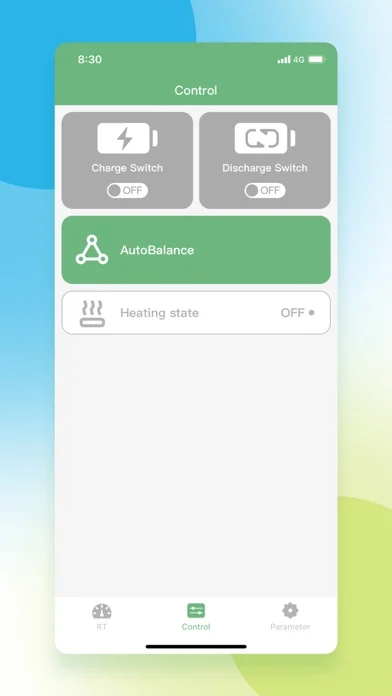
Active balancing moves charge between cells and can operate differently, but an app label such as AutoBalance does not prove the connected hardware contains an active balancer. Treat the hardware model, wiring diagram and manufacturer documentation as the source of truth.
- Passive balancing bleeds energy from high cells.
- Active balancing transfers energy and requires compatible hardware.
- App controls cannot add a balancing function the BMS does not support.
3. Read BAT BMS cell voltage and PressureDiff
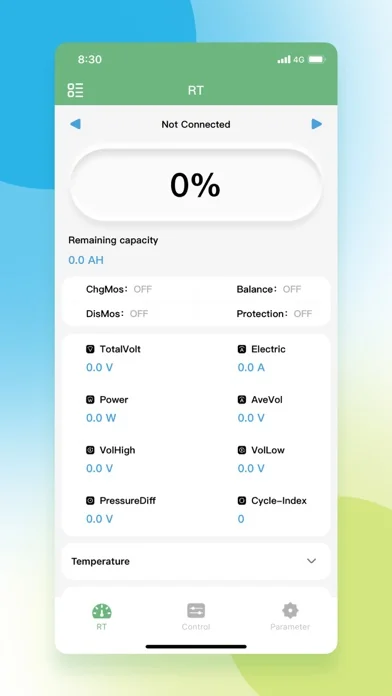
On the BAT BMS monitoring screen, compare VolHigh, VolLow, AveVol and PressureDiff together. PressureDiff is the high-to-low cell difference. If the app reports values in volts, 0.010 V equals 10 mV. Record the cell numbers as well as the size of the spread so you can see whether the same cell repeatedly leads or lags.
Readings under heavy charge or load include voltage drop from current, connections and temperature. For a useful comparison, reduce the load, let the pack stabilize when safe, and compare several sessions at a similar state of charge.
- Example: 3.455 V minus 3.438 V equals 0.017 V, or 17 mV.
- A repeating high or low cell matters more than a single changing cell number.
- Confirm critical values with appropriate test equipment and qualified service.
| Observed pattern | Likely interpretation | Next safe action |
|---|---|---|
| Small, stable spread | May be normal measurement or state variation | Record it and compare at the same charge stage |
| Spread grows near full charge | Balancing may be needed or already active | Check balance status and hardware thresholds |
| One cell repeatedly reaches the limit first | Possible capacity, connection or calibration issue | Stop aggressive charging and investigate the pack |
| Spread changes only under load | Current path or connection resistance may contribute | Compare at rest and inspect connections safely |
4. Why a LiFePO4 BMS may not balance
No visible balancing does not automatically mean the BMS is faulty. The pack may be below the start voltage, the cell delta may be below the configured trigger, charging may be off, the BMS may be asleep, temperature may be outside its permitted range, or the connected model may not expose balance status to the app.
If a cell reaches overvoltage protection before the others, repeatedly restarting charge can increase risk. Do not bypass protection or raise thresholds to force completion. Check sense wiring, charger settings, cell condition and the exact BMS configuration with the battery supplier or a qualified technician.
- Verify the charger is appropriate for the battery and series count.
- Check whether Charge, ChgMos, protection and temperature states allow charging.
- Confirm the correct BMS model and balance capability.
- Treat repeated overvoltage or heat as a stop condition.
5. A safe balancing check with BAT BMS
Start with a visual inspection. Do not charge a swollen, damaged, leaking, unusually hot or odorous battery. Wake the pack according to its manual, connect from one phone, and save a screenshot of total voltage, each cell voltage, current, temperature, protection state and MOSFET state before changing anything.
If the hardware maker permits top-of-charge balancing, use the specified charger in a supervised, ventilated area and watch whether the high-to-low spread narrows. Stop if one cell rises rapidly, protection repeats, temperature climbs abnormally or the battery shows physical warning signs. The safer goal is diagnosis, not forcing the app to display a balanced number.
- Observe before editing parameters.
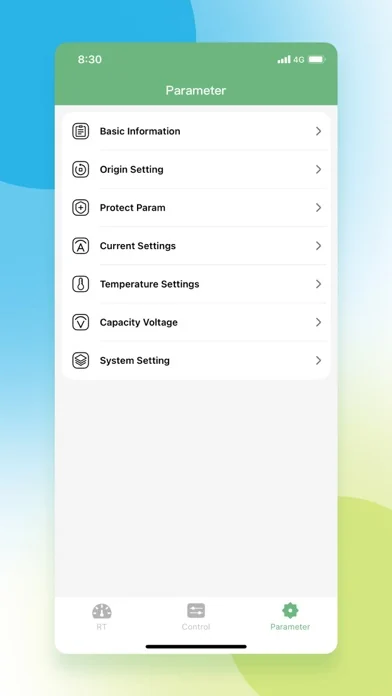
- Use manufacturer values for charge voltage and balance thresholds.
- Keep dated screenshots to compare trends.
- Disconnect and seek service when physical or repeated protection warnings appear.
6. Do not use one universal voltage-difference rule
Online advice often labels a fixed millivolt spread as good or bad, but the useful limit depends on measurement accuracy, cell chemistry, current, temperature, wiring, state of charge and the BMS maker's design. A small spread under load can disappear at rest, while a cell that repeatedly runs high near full charge may deserve attention even if the pack looks normal in the middle of the curve.
Use the manufacturer's threshold first. When no verified threshold is available, track direction and repetition rather than changing parameters. A growing spread, one repeating outlier, earlier-than-normal protection or reduced usable capacity is stronger evidence than a single unlabeled screenshot.
- Avoid internet settings copied from a different series count or cell brand.
- Do not disable protection to let balancing continue.
- Escalate recurring outliers to the pack or BMS supplier.
LiFePO4 BMS balancing FAQ
Does a LiFePO4 BMS balance all the time?
Usually not. Many passive BMS units balance only during charging and only after configured cell-voltage and voltage-difference thresholds are met.
What does PressureDiff mean in BAT BMS?
It is typically the difference between the highest and lowest reported cell voltage. For example, 0.020 V equals 20 mV.
Why is AutoBalance on but the cells are not changing?
The hardware may be below its start threshold, the delta may be too small, charging may be inactive, protection may block operation, or the BMS may not support the expected balancing mode.
Should I raise the balance voltage or overvoltage limit?
Not without verified specifications for the exact cells, series count, charger and BMS model. Raising limits can defeat protection and create a battery safety risk.
How long does passive balancing take?
It can take hours because balance current is small. A large or recurring mismatch may indicate a cell, wiring, calibration or configuration problem rather than a need for endless charging.
Can the BAT BMS app repair an unbalanced battery?
No. It can display data and compatible controls, but it cannot repair damaged cells, loose sense wiring, poor connections or an incorrectly configured battery pack.
Technical and official references
- Texas Instruments: battery cell balancing fundamentals - Passive and active balancing principles and design trade-offs.
- Orion BMS 2 operation manual - Manufacturer example showing that balancing behavior depends on configured voltage and operating conditions.
- BAT BMS on Google Play - Official Android app identity and current store listing.
- BAT-BMS on Apple App Store - Official iOS listing and screenshot source.